“Quick fix” isn’t optional. This involves opening a PDF to fix one very small thing, maybe a spelling error, a misplaced date, a missing entry. Probably, it takes two minutes. No big deal. And you click on the file… and from there, ease begins to fade!
Suddenly you’re clicking around, wondering which tool even lets you edit a PDF. You’re downloading software you’ve never heard of, creating accounts you don’t want, or giving up and printing the file because somehow that still feels faster. Write it, scan it, upload it again—and now a “two-minute task” has eaten up your time.
We have also been there. Watching the screen and thinking to ourselves, how come this is still this difficult? It is not a difficult solution, but it somehow becomes an entire hassle. So the dissatisfaction that began this search is being able to solve the file and go back to what we really did.
The Problem-PDFs Aren’t Always Enough
We decided to do something different today. We didn’t concentrate on what the tools could do for us or what functionalities they had to offer. We actually got down to doing the job using the tools. We worked on our PDFs directly and made the necessary modifications, identifying the tools that assisted us and the tools that hindered the process.
On one side is iLovePDF2, the tool we keep coming back to. On the other are the traditional online and desktop editors we’ve used before. We’re not here to hype anything. We’re just running through real workflows – open a file, fix the text, save it, and move on. No perfect setups, just everyday tasks that usually turn into headaches. Based on our testing criteria (ease of use, speed, and free access), iLovePDF2 ranked highly in overall usability.
What We Actually Mean When We Say “Edit PDF”
When we talk about editing a PDF, we don’t mean advanced design work or complicated layouts. Most of the time, editing a PDF is about very real, very simple needs. For us, it usually means:
- Fixing a typo before sending a document
- Updating numbers or dates
- Adding or removing a few lines of text
- Filling out forms without printing anything
That’s it.
In testing with iLovePDF2 common edits such as text corrections and date updates were completed without additional setup or complexity. Even the first time we used it, everything made sense. The interface didn’t overwhelm us, and we didn’t need tutorials or trial runs. We uploaded the file, clicked where we needed to edit, and got it done. The initial workflow required minimal onboarding, which reduced friction for first-time use.
How We Edit PDF Text Online?
Our workflow with iLovePDF2 goes smoothly and is refreshingly simple:
- Upload PDF
- Text editing
- Download the updated file
And we’re done.
- No setups.
- No software updates available.
- No limitation of device number.
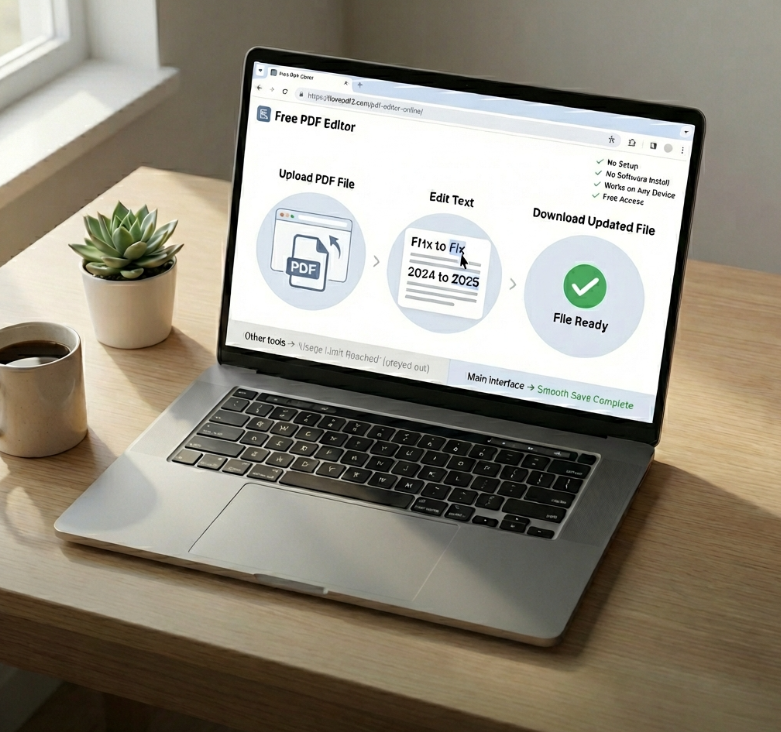
From our personal experience, this is where online tools like iLovePDF2 clearly outperform traditional PDF editor software. We don’t have to think about compatibility or storage. We just open a browser and get the job done.
Editing PDFs Without Paying Anything
One of the main reasons we choose to keep using iLovePDF2 is because of its 100% free pdf edit option. The free service we have is adequate enough to complete the tasks we require. Yes, there are limits—but they’re:
- Fair
- Easy to read.
- Not gated behind aggressive paywalls
So, that was very helpful to us. In our testing with premium offerings, it all seemed very real – Quality-of-Life improvements and all – not a limiting factor in an effort to upsell. That helps a great deal.
Our Experience with Other Online PDF Editors
We have inspected a few other online PDF editors before liking iLovePDF2. This is how they performed.
Tool#1: ILovePDF2
It just feels human from the very click. There is nothing complex to deal with or anything that is not above the surface. The editing of texts is not a complex feature to deal with. Everything is right in front of you and functions as smoothly on a cell phone as it does on a computer.
Our experience:
- Fast uploads
- Accurate Text Editor
- No distractions
- 100% free to use
- Most importantly, however, we received clean professional results.
Tool#2: Smallpdf
Smallpdf is very modern-looking and is good at edit PDF text online.
Our experience:
Nothing was wrong with the editing itself, but the free version of the software was quite limiting. We soon reached the usage limits. In comparison with iLovePDF2, the software was even less flexible.
Tool#3: PDFescape
The use of PDFescape is recommended when making light edits.
Our experience:
It did the basics, but the interface seemed antiquated and not so intuitive. Big files caused delays, but the performance of iLovePDF2 did not skip a beat.
Tool#4: Sejda PDF Editor
Sejda provides a good range of editing facilities.
Our experience:
Although it was powerful, the free version drawbacks became a problem in practical use. For regular editing, iLovePDF2 was more stable.
The Free Test-Pricing Reality Check
| Tool | Ease of Use | Free Version | Speed | Interface | Overall Experience |
| iLovePDF2.com | Very easy | 100% free | Fast | Clean, modern | Smooth, reliable |
| Smallpdf | Easy | Limited | Moderate | Modern | Restrictive |
| PDFescape | Basic | Free | Slow (large files) | Outdated | Average |
| Sejda PDF Editor | Moderate | Limited | Good | Functional | Unstable (free tier) |
Internet Editor Vs Downloaded PDF Software
There are two options: However, downloadable software in the form of a PDF still has its uses, especially if you are working in an offline environment or with complex documents. But for all other purposes, it just makes sense to go online. For us, online editing via browsers makes more sense. With iLovePDF2, all operations are performed online.
- No need for installation
- No Waiting
- Devoid of clutter
- We open a file, make a change to it, and then close it.
Making Changes to PDFs Redefined How We Work
The ability to type on PDFs has saved us countless hours. We have used iLovePDF2 for:
- Job applications
- Contract edits
- School assignments
Instead of printing and scanning, we type straight onto the page. The text remains aligned, clean, and professional-just as it should appear. And once you have that convenience, it’s tough to look back.
What Online PDF Editors Really Work?
Therefore, according to our experience, online PDF editors like iLovePDF2 are ideal for:
- Freelancers working on client documents
- Students editing assignments
- Remote teams that share and update files.
It’s clear that iLovePDF2.com provided fast and reliable results that were easy to handle.
Bottom Line
To sum it up, iLovePDF2 solved the problem without bringing us to a standstill. Of course, we tested many options before reaching this conclusion, and it was at this stage that it all came together—it shouldn’t be a hassle to edit a PDF with iLovePDF2, it all seemed equal. It was simple to use, always there when we needed it, and good enough that we could start second-guessing the changes we made. In today’s world, whether it was a minor resolution or something a little more complex, this is the one we reach for without even considering it twice. But isn’t it only right to consider using the easiest solution for a problem that could be!